Offline topo & marine GPS for iPhone and iPad
Your map should not need a signal.
NavGPS puts the whole map on the phone before you leave the pavement. Download the ground you are headed into, record every mile of the way in, watch your engine while you drive it, and let your family see where you got to.
On the App Store
$9.99 once — no subscription, no ads, and no account needed to use the map.
iPhone and iPad, iOS 18 or later.
What is in it
Five apps' worth of work, in one that runs with the radio off.
A topo map, a track recorder, a trail library, a family locator and an engine gauge cluster. They share one map, one track database and one set of downloads.
Offline maps
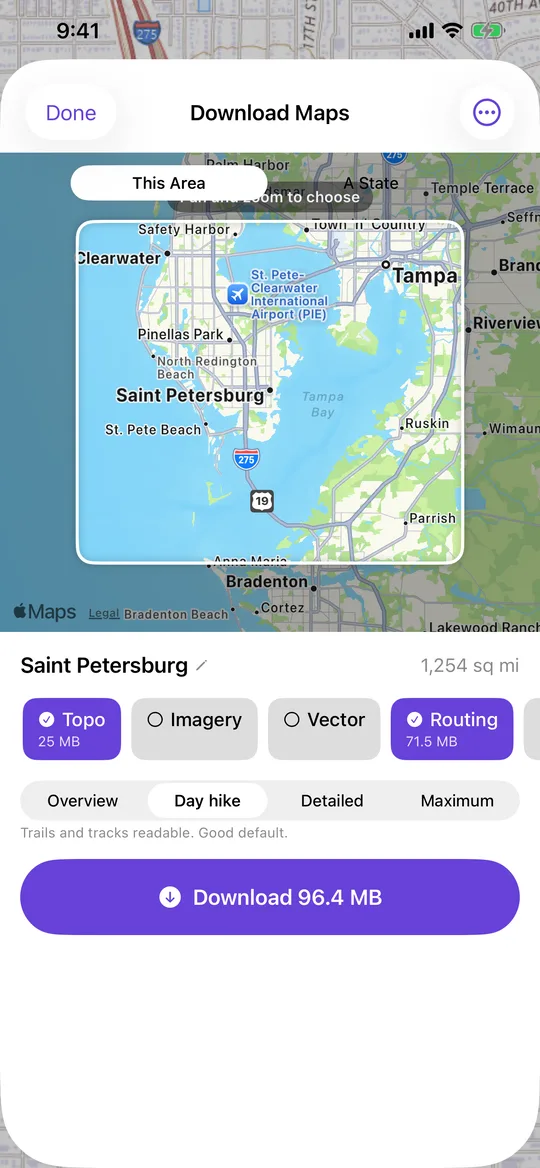
Pull USGS topographic maps, satellite imagery or street maps onto the phone before you go. Pick a box on screen, a whole state along its real border, or a corridor following a track you have already driven.
Read more →Track recording
Every fix is written to disk the moment it lands, so a dead battery costs you nothing. Distance, moving time, ascent smoothed by the barometer, and photos pinned to the exact spot you took them.
Read more →Trail Library
US Forest Service routes are already in there, plus whatever people publish. Download one into your own library and follow it with the radio off.
Read more →Family Circle
Always-on location sharing with people you approve one at a time. See where everyone is, how fast they are moving and what their battery is down to — and pause your own sharing whenever you want.
Read more →Engine dashboard
Plug in an OBDLink MX+ and read coolant, transmission temperature, fuel trims, voltage and real fuel burn — logged against the track you are recording so you can read the drive back later.
Read more →No account to make
Nothing to sign up for. Your name travels with the phone. Cloud sync ships switched off, and the app works end to end without ever turning it on.
Read more →Offline first
Download it before you lose the bars.
Not a cache that happens to survive. A deliberate download, with the size on the button before you tap it.
- Three ways to choose an area. A box on the screen, a whole state cut to its real border, or a 250 m to 1 km corridor following a track you recorded.
- Four levels of detail, from an overview down to maximum zoom, each with the download size shown per layer before anything starts.
- It survives a force-quit. Pause it, switch apps, or kill the app outright and the download carries on from where it stopped rather than starting over.
- Overlapping areas share their ground. Deleting one frees only what nothing else still needs, and the size it shows you is the space you actually get back.
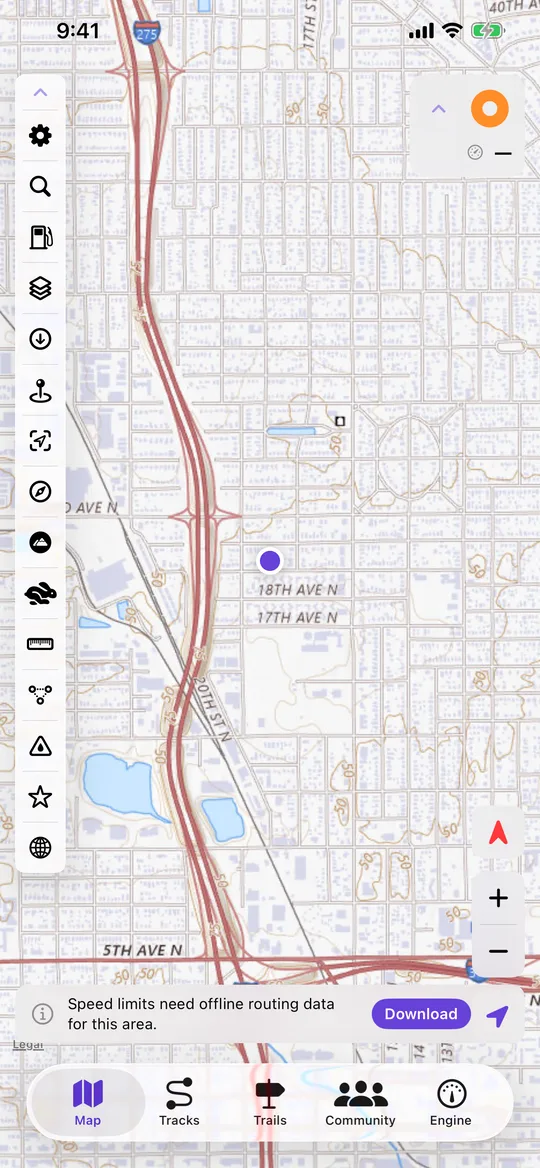
- Roads come down with the map. Routes on foot, by bike or by car with no signal, drawing the line and the turns for it.
- One screen holds all of it. Maps, street areas, roads, terrain and imported charts — each with its size, and a swipe to delete.
Base maps and overlays
The layers that matter a long way from pavement.
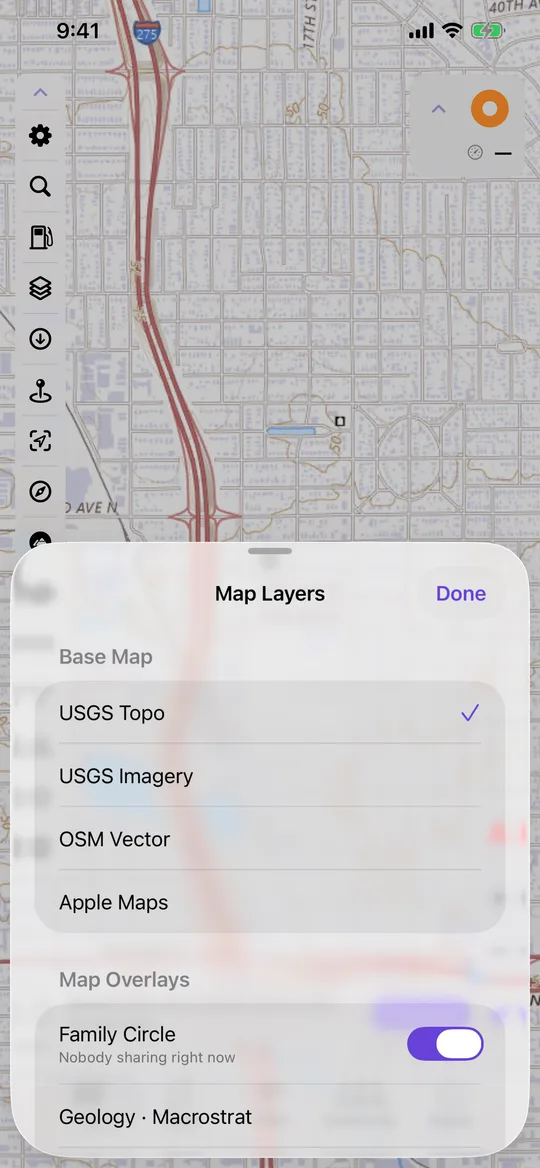
Four base maps and a stack of overlays you can switch on one at a time.
- USGS topographic maps and satellite imagery, street maps in five styles including a dark one for night, and Apple Maps when you are back in town.
- Bring your own charts. Map files you already have import and read straight off the phone — NOAA's nautical charts included.
- Slope angle shading, banded from 27° up and working offline, so you can see the runout before you commit to it.
- Terrain shading, geology, streams and watershed boundaries, a coordinate grid, animated weather radar and posted speed limits that work offline.
- Six coordinate formats — decimal, degrees-minutes, DMS, UTM, MGRS and the British Grid — with great-circle or rhumb-line bearings for working off a chart.
- 3D terrain, a side-by-side map comparison, tide predictions, a two-point measure and waypoint projection by bearing and distance.
Trail Library
Routes somebody has already been down.
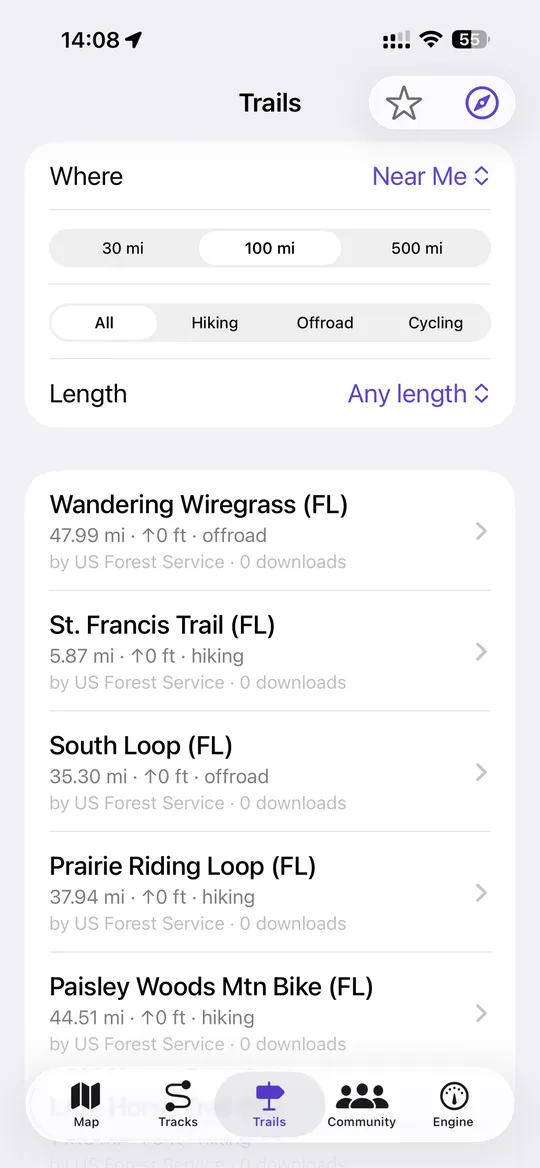
Seeded with US Forest Service Motor Vehicle Use Map routes, and open to anything you want to publish.
- Search near you or by state, filter by hiking, offroad or cycling, and narrow by length.
- Download a trail into your own library and it becomes a real track you can follow, with the map already on the phone.
- Publish your own with a name, an activity and a description of what to expect — and unpublish it again whenever you like.
- Photos along the route from the people who recorded it, plus openly licensed shots nearby from Wikimedia Commons.
- Browse it in a browser at navgps.app/trails, with a GPX download on every route and no sign-in in the way.
Family Circle
Everyone on one map, on terms you set.
A circle is joined with a six-character code, and the person who owns it approves you before anybody can see where you are.
You approve, then they see you
Join with a code and you sit as pending until the owner lets you in. Until then the server hands you nothing and hands nobody your position.
Pause it any time
Sharing is a switch, per circle. Hiding the circle on your own map is a separate thing entirely and never changes what you share.
What a pin tells you
Last position with the street it is on, speed, battery, whether they are moving or stopped, and how long ago that was. Anything older than a day shows as no fix at all.
Convoy, for one trip
Groups are separate and temporary: switch convoy on and everyone sees each other's live trail for the ride. A web link lets people follow along from a laptop.
Share a track, not your life
Send a finished track to a group or to one person. They download it into their own library and follow it offline from then on.
Crash detection, described honestly
While a drive is recording, NavGPS watches for a hard impact followed by the vehicle stopping. It asks you first — thirty seconds to say you are OK — and only then tells your circle, with your location.
It reaches your family, not a dispatcher. It cannot see low-speed impacts, and it is not a substitute for calling 911.
Engine dashboard
A gauge cluster your truck never came with.
Pair an OBDLink MX+ over Bluetooth and the Engine tab reads whatever your vehicle will answer to — and writes it down next to the track you are recording.
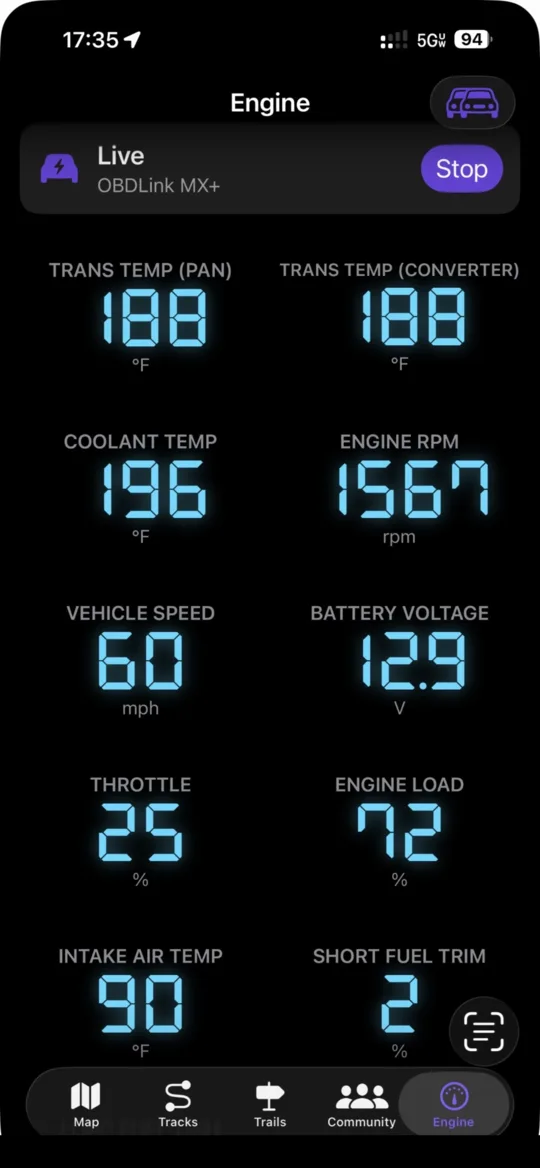
Twelve readings out of the box
RPM, speed, coolant, intake air, engine load, throttle, short and long fuel trims, battery voltage, fuel level, mass air flow and manifold pressure. On Toyota and Lexus, transmission pan and converter temperature as well.
The app probes what your vehicle supports and hides the rest rather than showing you a made-up number.
Add your own parameters
Boost, oil temperature, anything your make exposes: type the hex request and a Torque-style formula, test it against the vehicle, and it joins the dashboard with the unit and refresh rate you picked.
Lay it out your way
Show, hide and drag each reading into the order you want it. Digital seven-segment or a drawn dial, normal width or full width, with warning and danger bands that colour themselves.
Alarms that speak up
Set a ceiling or a floor on any value. It buzzes, says the reading out loud over your music, and puts a red strip across the Engine tab and the map until it clears.
Fuel burn you can trust
Gallons this drive, cost, and distance to empty — from the mass air flow sensor, or derived from manifold pressure when there is no MAF. Range starts on the EPA rating and switches to your own measured economy once it has the miles, and says which it is using.
Codes, VIN, and the drive afterwards
Read stored and pending trouble codes, clear the check-engine light, and pull the VIN. Every sample is logged against the track, so a finished route can be coloured by transmission temperature, coolant or speed from end to end.
Requires an OBDLink MX+ adapter, paired in iOS Settings first. The cheaper Bluetooth LE and Wi-Fi adapters cannot be used by any iPhone app, including this one.
Get it
$9.99. Once.
No subscription, no ads, and no account to create — download it and the map is there. Three years of a competing subscription runs over a hundred dollars; three years of NavGPS is $9.99.