Family Circle, groups and convoy
NavGPS has two different kinds of location sharing on purpose. A Family Circle is persistent: everyone in it shares their position with each other, always, until they leave. A group is ad hoc and ride-scoped: a code you hand your crew, a shared inbox of tracks, and a convoy map that shows everyone's vehicle while the drive is happening. They are kept apart in the app and on the server, so someone you drove with once can never end up in the always-on family path.
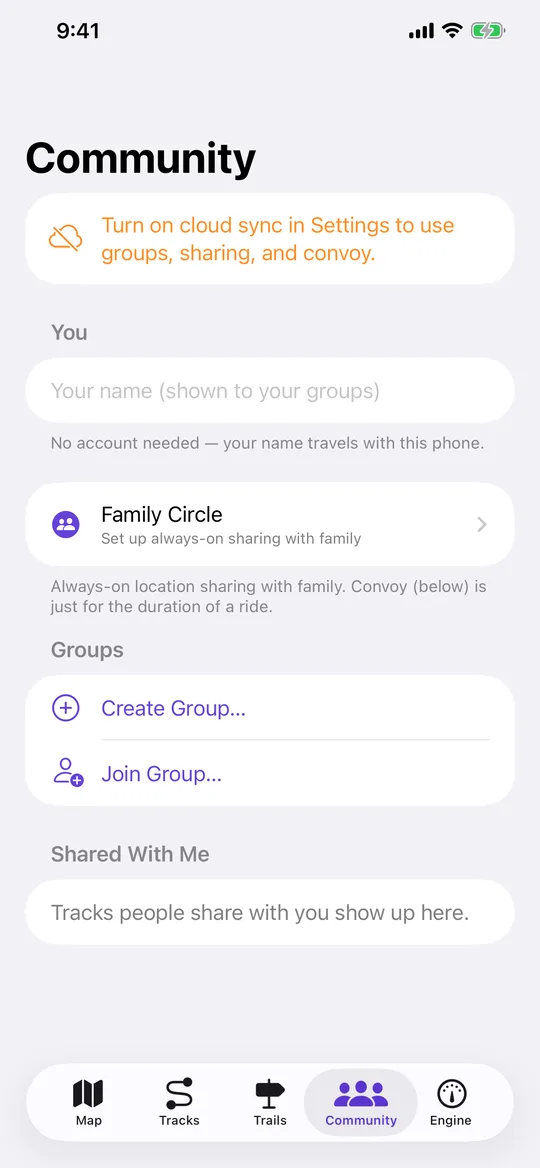
No account, just a name
There is no sign-up. The app registers the device itself and keeps its token for you; the only thing you type is the name your groups and circles will see, and that name travels with the phone. Cloud sync has to be on for any of the sharing features to work, and the Community tab says so plainly when it isn't.
Family Circle: always on, and approved by the owner
You create a circle, and you get a six-character invite code and a link to send your family. The code alphabet leaves out the characters that get misread — no 0, O, 1, I or L. Someone who joins with the code lands as pending: the circle's owner approves them before they appear to anyone or can see anyone else's location. The person waiting sees a row telling them their request landed, and nothing more, because they are not in the circle yet.
Each circle's roster shows every approved member with how recent their last position is, their battery level, and whether they are moving or stopped. You can pause your own sharing to a circle whenever you like and resume it later; the owner can remove a member; anyone can leave; and if the owner deletes the circle it goes away for everyone. Drawing circle members on your map is a separate switch in the layers sheet — it only decides whether their pins are drawn, and never changes what you or anyone else shares.
Presence that survives a force-quit
The always-on half of a circle is a presence engine that is deliberately decoupled from recording: your position flows whenever you are sharing to any circle, whether or not a track is being recorded. It runs at neighbourhood accuracy with a 50 metre distance filter and only uploads when you have moved 40 metres or 25 seconds have passed, so a parked phone still reports in without costing much battery.
Durability comes in layers. While the app is alive, background location updates stream fixes. Beyond that, each upload re-centres a small geofence on your current position, and region monitoring is the most durable wake source iOS offers — leaving that fence relaunches the app invisibly even after a force-quit or a reboot, at which point it pushes a fresh position and moves the fence again. Each upload holds a background-task assertion so it finishes inside the few seconds iOS gives. If you are sharing but the system grant is not enough to keep you visible in the background, the map says so rather than letting you believe your family can see you.
Emergency alerts
The SOS button tells everyone in every circle you are approved in that you need help, and sends your last known location with it. It fans out to all of them deliberately: someone who has their family in one circle and their travel companions in another wants both told, and a crash is not the moment to make them pick. An alert arrives as a time-sensitive notification, which is the one notification in the app allowed to break through Focus, and the row in the app carries the coordinates and a Directions button, because that is not the moment to make anyone tap through to find an address. Alerts stay visible for a day, so someone who picks their phone up an hour later still learns what happened, and only the person who raised one can stand it down. With no push server in the picture, the alert check rides along with the presence upload, which is what lets an alert reach a phone sitting in someone's pocket.
The app is explicit that this reaches your family, not a dispatcher, and that 911 is for an actual emergency.
Crash detection that asks you first
While a drive is recording, NavGPS can watch for a hard impact followed by the vehicle stopping. The detector is knowingly cruder than Apple's: Apple fuses accelerometer, gyroscope, barometer, GPS and microphone, and this has two of those signals. What makes two usable is that they cover each other's weaknesses — a phone dropped on the floor registers the same acceleration as a real crash but does not stop the car, and a panic stop from highway speed looks like an impact between two GPS fixes but does not produce eight g. Requiring both, in order, and only while the vehicle was already doing roughly 25 mph or more, removes most of both problems.
Anything that survives that is still only suspected, so the phone asks you first with a loud prompt and a countdown, and the circle is told only if nobody answers. That makes a false positive cost one dismissal, which is the trade that lets an imperfect detector be worth having. The app states its limits: it cannot see low-speed impacts, and it is not a substitute for calling 911.
Groups, shared tracks and convoy
A group is a name and a six-character code. Create one and share the code, or join someone else's. Members can share a synced track with the whole group or with one person; what arrives shows up in a Shared With Me inbox, and downloading it saves that track into your own library, where it is followable and fully offline. Convoy is the live half: with a group selected, every vehicle in it that is recording appears on one map with its recent trail and the age of its last fix, and that map is also viewable in a browser by code at navgps.app/convoy. Unlike a circle, convoy stops when the drive does.