Tracks and waypoints
A track recorder has one job it cannot redo later: do not lose the recording. NavGPS saves every position the moment it arrives rather than at the end, keeps recording with the screen off, and recovers a track that was still running if the app is killed. All of it stays on the phone whether or not you turn on cloud sync. What you get afterwards is a map, an elevation profile, a playback you can scrub through, and a GPX file other apps will accept.
Recording that does not lose anything
The recorder asks for location access the first time you press record, and upgrades to Always once a recording actually starts — background delivery already works without that, so the upgrade exists to drop the blue status pill and to let the system relaunch the app. Fixes come in at best accuracy with a five-metre distance filter, and anything with a horizontal accuracy worse than 50 m is discarded, because coarse cell or Wi-Fi fixes put spikes in a track. Duplicate and out-of-order fixes are dropped so timestamps stay monotonic.
Every accepted fix is inserted synchronously into the database, so each one is on disk before the next is considered. If the app is killed mid-recording, the next launch recomputes that track's statistics from whatever reached the disk and marks it complete; a track that never received a single fix is deleted rather than left behind as a zero-distance stub.
Pauses that read correctly afterwards
A manual pause suspends GPS without ending the track — a lunch stop, a ferry crossing — and resuming starts a new segment, so the live map and the exported GPX show a gap rather than a straight line teleporting across it.
Auto-pause, if you turn it on, stops storing points after about fifteen seconds of standing still and starts again when you are clearly moving, using a higher threshold to resume than to pause so it does not flicker on and off at a rest stop. The point is to avoid the cloud of jitter that otherwise accumulates wherever you park.
Numbers that mean something
Distance is great-circle between consecutive fixes. Moving time ignores any gap longer than ten seconds, which is a recording pause rather than movement, and any stretch slower than half a metre per second, which is GPS jitter rather than walking. Ascent and descent only accumulate once elevation has changed by at least three metres, which filters the noise that otherwise turns a flat ride into hundreds of metres of fictional climbing.
Where the phone has a barometer, its relative-altitude feed is fused with GPS altitude for the elevation profile: the barometer has the shape and GPS has the truth. Peak speed drops any single sample above 45 m/s, so one bad fix cannot define the maximum for a hike.
The breadcrumb trail, for when you forgot to press record
With the breadcrumb trail switched on, the app keeps a passive line of crumbs while it is open and not recording — one every five seconds at most, kept for twelve hours, pruned at launch. It draws on the map, and the layers menu offers to save it as a real track; gaps longer than five minutes become segment boundaries so the saved track does not pretend you travelled in a straight line between them. Then the buffer clears.
The library: folders, favourites, GPX both ways
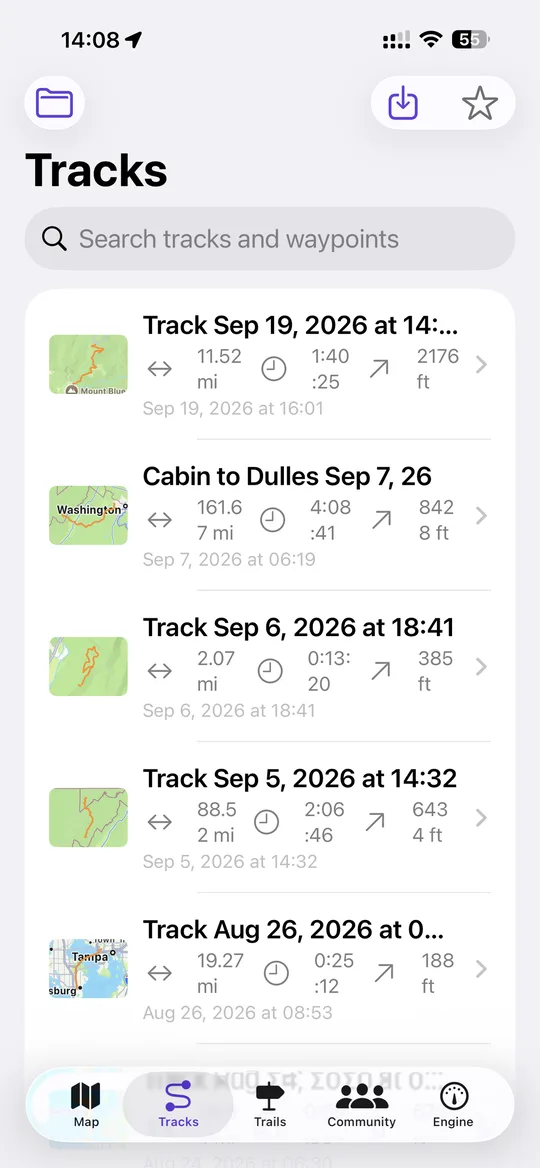
Tracks and standalone waypoints live in one searchable list with map thumbnails, distance, duration and ascent on each row. You can star a track, move it into a folder you make up as you go, rename it, or delete it. Waypoints carry a name, a note, a photo and their coordinates in whichever format you have chosen.
Import takes several files at once and is forgiving: extras it does not recognise are skipped rather than treated as errors, which is what lets old MotionX archives come in cleanly, and a route broken into several legs stays broken into the same legs. Files holding tens of thousands of points import without locking up the app. What NavGPS exports is strict, clean GPX, so Gaia, Caltopo and the rest accept it without complaint.
What a saved track can do
Opening a track gives you the route drawn on whichever map layer you are using — one polyline per segment, so pauses stay visible — with its waypoints, an elevation profile, and the full statistics panel. Playback replays the route as a moving marker with a growing travelled line, at between 1× and 1000×, following the real timestamps; a track whose timestamps are unusable falls back to a distance-based timeline so the marker still moves at a constant ground speed instead of not at all. The elevation profile carries a playhead that follows it.
From there a track can be followed on the map, previewed in 3D terrain, used as the destination for driving directions to its start point, tagged with a sport type, given a photo and a note, exported as GPX, shared to a group or one person, published to the Trail Library, or shared as a live link if cloud sync is on. If an OBD-II adapter was connected while you drove, the engine readings logged against that track can colour the route by transmission temperature, coolant temperature or vehicle speed, with the low and high values labelled.